SpinBetter Registration: Sign Up the Right Way and Unlock the Full Welcome Bonus
SpinBetter registration is quick — under two minutes for the account itself — but the choices you make during sign-up lock in your welcome bonus track and determine whether you get the full offer or a watered-down version. This guide walks through every step in order, explains where to enter the promo code, covers the critical casino-vs-sports bonus decision, and closes with KYC expectations so the first withdrawal goes smoothly. For Indian players specifically.
If you're comfortable with the basics already, jump to our promo code page for details on what SPINNOW unlocks, or the full bonus breakdown for wagering math and step-by-step claiming.
Register now and claim the welcome package
Promo code SPINNOW activates up to 1,500 EUR + 150 free spins on casino or up to 500 EUR on sports.
Start registrationRegistration methods: four ways to sign up at SpinBetter
The SpinBetter sign up form offers four routes to a SpinBetter account. They all lead to the same place, just with different data collection steps.
- By email. Standard registration — email, password, country, currency, promo code. Takes 90 seconds. Most players use this route.
- By phone number. Enter your mobile, receive an SMS OTP, confirm. Slightly faster than email but requires SMS delivery, which occasionally gets delayed on certain Indian carriers during peak hours.
- One-click registration. The SpinBetter system generates credentials automatically based on country and currency — you get a username and password to save. Quick but you need to write down what you're given or you'll be locked out.
- Social networks. Google, Apple, Telegram, Twitter (X), Steam and Discord all work. The fastest option — two clicks and you're in, SpinBetter pulls basic profile info from the provider.
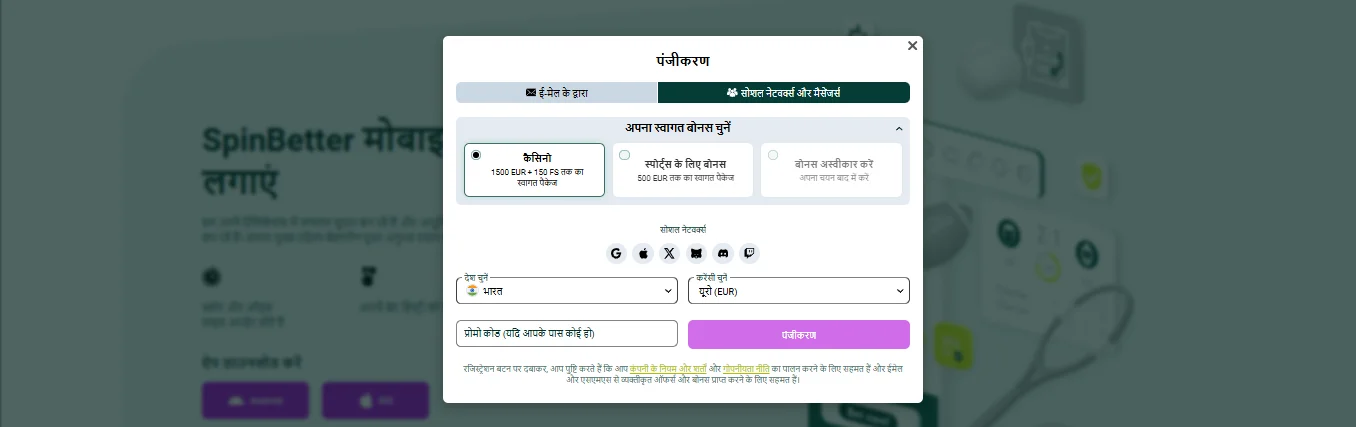
The critical decision: casino bonus vs sports bonus
Before the registration form asks you for credentials it asks which welcome bonus you want. This is the single most important decision in the sign-up flow and most players rush past it.
Casino welcome package
Up to 1,500 EUR + 150 free spins across four deposits. Wagering x35 of the bonus amount. You have 7 days to clear each bonus. Pick this if you play slots, live dealer, Aviator or casino games primarily.
Sports welcome package
Up to 500 EUR across five deposits. Wagering x5 in accumulators of 3+ selections at 1.50+ odds. Pick this if you bet cricket, football, tennis, esports or any sport.
The two packages are mutually exclusive — you can't take both, and switching mid-package cancels whatever you haven't claimed yet. A third option, "Refuse bonus", exists for players who want clean terms and immediate withdrawability with no bonus attached. Pick Refuse only if you know exactly why you're doing it.
Opt in before you deposit
The bonus type must be selected before your first deposit, in the registration modal or — if you skipped it — in Account Settings under "Bonuses" before you transfer any money. Depositing without opting in results in no welcome bonus credited and support usually can't retroactively apply it.
Step-by-step: SpinBetter registration by email (the recommended route)
- Visit the official SpinBetter site. HTTPS only, always manually typed or from a bookmark. Phishing sites that clone the registration form exist — protect yourself by double-checking the domain.
- Click the green "Registration" button in the top right. A modal opens with the four registration method tabs.
- Select "By Email". The form expands to show email, password, country, currency and promo code fields.
- Select your welcome bonus. Casino or Sports — based on the decision above. This is usually at the top of the form.
- Fill in your email address and a strong password. Minimum 8 characters, at least one number. Use a password you don't use anywhere else.
- Select India as your country and INR as your currency (or EUR/USD if you prefer — the welcome bonus caps are quoted in EUR but SpinBetter converts for display). INR is the easiest for deposits through UPI and PayTM.
- Enter promo code
SPINNOWin the dedicated field. This is the step most people skip. Without the code, you may get a partial welcome bonus or none at all. - Tick the box confirming you're 18+ and accept the terms. Required — SpinBetter verifies age through KYC before your first withdrawal.
- Click Register. You'll receive a confirmation email within a couple of minutes. Click the verification link to activate the account. Until you verify the email, withdrawals are blocked even if you play and win.
Completing your profile after registration
The initial SpinBetter registration creates a minimal account — enough to deposit small amounts and play. To unlock the full bonus activation and remove withdrawal limits, you need to complete your profile. Go to Account Settings → Personal Info and fill in:
- Full legal name exactly as it appears on your ID.
- Date of birth — must show you're 18+.
- Residential address including PIN code. Used for deposit/withdrawal risk checks.
- Mobile phone number — this one gets an SMS OTP to verify. Must be activated before the welcome bonus can credit.
Phone verification is the step that most commonly trips up new players, because the bonus won't credit on your first deposit if the phone hasn't been confirmed. Do this immediately after registration, before you make the deposit.
Choosing currency: INR, EUR or crypto?
SpinBetter supports INR natively along with EUR, USD, GBP and around a dozen other fiat currencies, plus BTC, ETH, USDT, LTC, DOGE, TRX and others for crypto accounts. Your currency choice affects how SpinBetter deposits, withdrawals and bonus caps display across your account.
- INR makes UPI, PayTM and PhonePe deposits cleaner because there's no FX conversion on every top-up. The welcome bonus displays in INR but the EUR caps still apply internally (1,500 EUR ≈ ₹1,38,500 at current rates).
- EUR or USD matches the bonus T&Cs directly — no conversion ambiguity — but adds FX spread on every Indian deposit.
- Crypto is the fastest for withdrawals but some bonuses are restricted on crypto accounts (the casino reload and sports reload are not available to crypto wallets).
We'd recommend INR for most Indian players. Crypto accounts make sense if you already hold USDT or BTC and want sub-15-minute cashouts as a priority.
Registering inside the SpinBetter mobile app
The SpinBetter mobile app has the same registration flow, just formatted for phone screens. Download the Android APK or install via iOS TestFlight (see our app guide), open the app, tap the register icon and work through the same four-method form. The app-exclusive free bet offer becomes available to you after registration through the app — 10 qualifying bets, up to 10 EUR free bet.
KYC: what to expect before your first withdrawal
Know Your Customer verification is mandatory before your first withdrawal above the KYC threshold (currently around 50 EUR equivalent). Submitting documents upfront, before you've won anything, makes the first cashout painless. Delaying puts you in a queue when you actually want to withdraw.
- Go to Account Settings → Verification. You'll see document upload slots.
- Upload a government-issued photo ID. Aadhaar, passport or driving licence all work. The photo must be clear enough to read, and both front and back if applicable (Aadhaar needs both).
- Upload a selfie holding your ID next to your face. The image must show your face and the ID together, no photo-of-photo, no filters.
- For higher tiers, upload proof of address. Utility bill or bank statement dated within the last 3 months showing the address from your profile.
- Wait 24–48 hours. Verification emails notify you when approved. Rejections come back with specific reasons (blurry image, name mismatch, expired document) and you can re-upload.
Common registration mistakes and how to avoid them
Fake or inaccurate personal info
Don't use made-up names or borrowed details at registration. Your ID will eventually need to match the profile for KYC, and any discrepancy freezes withdrawals. Register under your actual name the first time.
Multiple accounts from one household
One account per person, one account per IP, one account per payment method. Signing up a second account to grab another welcome bonus gets both accounts flagged and suspended. SpinBetter detects duplicates through IP, device fingerprinting and payment matching.
Skipping the welcome bonus opt-in
If you click past the bonus selector and deposit immediately, you default to no bonus. Going back to opt in after depositing doesn't retroactively apply the offer. If this happens, contact live chat before you place your first bet — occasionally they can override the default selection manually.
Not verifying your phone before the first deposit
The welcome bonus is contingent on phone verification. Deposit without verifying and the bonus won't trigger. Verify first, deposit second.
Wrong country selection
If you accidentally select a country other than India, certain payment methods (UPI, PayTM) won't appear and regional bonuses get applied differently. Contact support to correct it before depositing.
After registration: where to go next
Verify your email · Verify your phone · Upload KYC documents proactively · Review the bonus terms on our bonuses page before depositing · Opt into the right welcome track in Account Settings if you haven't already · Make the first deposit (minimum 10 EUR on casino track, 1 EUR on sports track).
Registration closing thought
A clean SpinBetter registration — right bonus choice, promo code entered, profile completed, KYC submitted — sets you up for a smooth first session and a frictionless first withdrawal. The account itself is forgiving; the bonus terms are not. Get registration right the first time and you skip 80% of the support tickets new players end up opening.
Ready to create your SpinBetter account?
Sign up takes 90 seconds. Use promo code SPINNOW and choose the casino or sports welcome package based on how you plan to play.
Sign up nowFAQ
How long does SpinBetter registration take?
About 90 seconds for the initial account. Full profile completion — name, date of birth, address — adds another minute. KYC document verification (required before the first withdrawal above the threshold) takes 24 to 48 hours from submission.
What documents do I need for SpinBetter registration in India?
Nothing at registration. For KYC before your first withdrawal: a government-issued photo ID (Aadhaar, passport or driving licence) and a selfie holding the ID next to your face. Proof of address — utility bill or bank statement within 3 months — may be requested for higher withdrawal tiers.
What's the SpinBetter sign up bonus worth?
You choose one of two welcome tracks at registration. The casino package pays up to 1,500 EUR plus 150 free spins across four deposits. The sports package pays up to 500 EUR across five deposits. The choice is locked in — you can't switch mid-package without losing what's left.
Do I have to enter a promo code during SpinBetter registration?
Not mandatory, but entering SPINNOW in the promo code field during registration activates the full welcome package. Entering it after the account exists doesn't retroactively upgrade the bonus, so get it in the first time. If you forget, contact live chat immediately, before your first deposit.
Can I register at SpinBetter from India?
Yes. SpinBetter accepts Indian players, supports INR as a base currency, integrates UPI, PayTM, PhonePe and Net Banking at deposit, and provides support in English and Hindi during peak Indian hours. No geo-block on the registration form.
Can I create more than one SpinBetter account?
No. One account per person is enforced through IP, device fingerprinting and payment method matching. Duplicate accounts get flagged and suspended, and any bonuses from them are void. Stick to a single account.
What happens after I complete SpinBetter sign up?
Verify your email through the link sent to you, verify your phone via SMS OTP, upload KYC documents proactively, choose your deposit currency (INR is simplest for Indian players), then make your first deposit to trigger the welcome bonus. Doing all of this on the same day keeps the sequence smooth.